Category: Development
Adaptive Backgrounds: The jQuery Plugin
Adaptive Backgrounds – a jQuery plugin to extract dominant colors from <img> tags and apply them to their parent.
 Hat tip to Thomas Gumz for this.
What the #$%@ is UX Design?
Learning How to Code with Bruce: The Results
For the past year, I have been teaching a course at Clark College in Vancouver, Washington called “Intro to Programming and Problem Solving (CTEC 121)”. During this time 60 students have successfully completed the course. Here is the class description from the course catalog:
Fundamental concepts related to designing and writing computer programs and procedures. Topics covered include: problem-solving techniques, program design, coding, debugging, testing and documentation. The course stresses concepts common to all programming. Prerequisite: Eligibility for ENGL& 101 and a grade of “C” or better in MATH 095. CTEC 120 recommended.
Typically, 95% of the students who take this class have had no prior experience with programming. In fact, it may even be higher than this.
RECAP: Students in CTEC 121 have never ever written a single line of code.
One other important to thing to mention is that 80% of the students who enroll in this class are not enrolled in a development focussed degree program. Most are from networking, business and other disciplines. Fascinating eh? Read on…
For the Fall quarter I decided to not give a final exam but rather a final practical project. Students were required to build a full-fledged application using the Python programing language. The project requirements included:
- Demonstrate use of all elements of the structure theorem (sequence, selection and repitition)
- Use on or more Python libraries
- Demonstrate the ability to read/write files
- and many other requirements…
On Monday the class presented their projects to the class and frankly, the students and I were totally blown away by their projects. Remember, these students have only studied programming in the CTEC 121 class for 9 weeks prior to creating their final projects. I wish you all could have seen the students faces when they saw demonstrations presented by the others.
To give you an idea of the types of projects submitted here is a list of some of the apps students created:
- An app that helps racing pit crews with calculating critical data needed for fueling, tire replacements and more
- An app that uses the Wikipedia API to read and display random Wikipedia entries using JSON and REST services.
- A math quiz app
- A complete graphical version of the game Battleship
- Several role playing games both text and based and graphics based
- The game Othello done with the graphics.py Python library
- A flash card creation and presentation app
- Several awesome versions of Tic-Tac-Toe
- An image processing app just like Instagram (complete with an MSI installer)
- and many others
Congratulations to all of the CTEC 121 students on creating such awesome final projects. You made this instructor very proud.
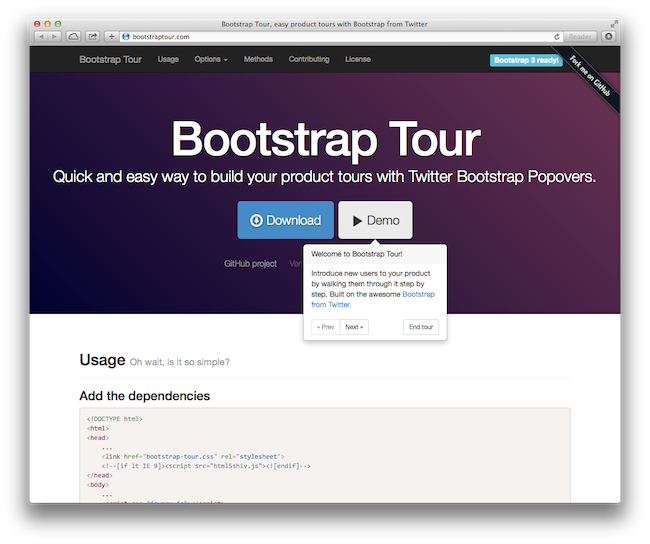
A very cool tool for Bootstrap sites
Bootstrap Tour provides a quick and easy way to build your product tours with Twitter Bootstrap Popovers.
Emmet (is Awesome)
Emmet (previously known as Zen Coding) is a web-developer’s toolkit that can greatly improve your HTML & CSS workflow. Basically, most text editors out there allow you to store and re-use commonly used code chunks, called “snippets”. While snippets are a good way to boost your productivity, all implementations have common pitfalls: you have to define the snippet first and you can’t extend them in runtime.
Emmet takes the snippets idea to a whole new level: you can type CSS-like expressions that can be dynamically parsed, and produce output depending on what you type in the abbreviation. Emmet is developed and optimised for web-developers whose workflow depends on HTML/XML and CSS, but can be used with programming languages too.
Chris Coyier of CSS-Tricks.com has a great video screencast on how to use Emmet when coding HTML and CSS:
Now can you imagine having a tool like this for IBM’s XPages?
Chris Coyier: A Modern Web Designer’s Workflow
They are the Champions: Part 1
Last week IBM announced a new class of champions for 2014. This blog post is the first in a series highlighting the great work of some of them. Here I go:
David Leedy
I first met David in New York City in October 2009 at the Tri-LUG user group meeting. While we had perviously met virtually, this was the first time we met in person. We shared a few beers and dinner and at that time he had given to Gayle and I an awesome set of all things Elguji branded coasters that he and his wife Becky made. It was truly an awesome gift. David and I have developed a very rewarding friendship. I can talk to David about anything and he is always there to listen.
As many of you may already know, David is the producer of the very successful NotesIn9 Screencast. Not only has David produced over 130 shows. While the screencast focusses primarily on IBM XPage technology, it also includes other topics including mobile app development, source control and much more.
David is also a strong and vocal advocate for IBM XPages technology. He is like no one else in this regard. David has published several versions of the XPages Cheatsheet.
David, thank you for all you do in this world. You are not only an IBM Champion but a personal hero of mine.
Julian Robichaux
It’s been a little over ten years since I first met Julian. We met at a blogger meet-up in Orland, Florida. I remember telling Julian I really liked the design of his NSF Tools website. The NSF Tools site was one of my favorite go-to reference site for advanced Notes and Domino code. It was truly a great privilege and honor to have met Julian. I felt as I was in the presence of one of the greatest coders I had ever known. This still holds true today.
It wasn’t until November of 2006 that I approached Julian to do a podcast. Thinking back, I had no idea why I approached Julian specifically to do this. Long story short, we started the Taking Notes podcast in 2006 and recorded 177 episodes. While we haven’t recorded any episodes since March 2013, the podcast is in temporary hiatus.
I am very grateful to call Julian a friend and to have had the honor of working with him on Taking Notes, several OpenNTF projects and application development projects for Elguji.
A Must Have Mac App for Developers: Structurer
It’s not secret that I do a lot of work lately with HTML/CSS, PHP, JavaScript and MySQL since my career at Clark College began a year ago. For years, make that decades I was spooled by the IBM Notes/Domino database templating feature. In the world of outside of Notes/Domino, you tend to work with a boatload of individual files when coding websites and web apps. A few months ago I came across the “Structurer” app from Nettuts+ which is the perfect tool for file based “templating”.
At the end of 2010, we released an exclusive Mac utility app, called Structurer. This app allows you to rapidly create file/folder structures for your new projects. Less than a month later, the developer, Cesar Tessarin, is back with a much improved version which now provides support for template creation, as well as assigning custom content automatically to newly created files. It’s fantastic, and, even better, 100% free to all of our readers!
Download Structurer for OS X >
There is also a “Structurer Pro” version available for Nettuts+ Premium Members >
Update: Hat tip to Jino Conklin for showing me Structurer in class earlier this quarter.
Ars Technica: What’s the difference between college-level and corporate programming?
This article strikes home as I am now completing my first year as a college instructor who teaches computer programming:
When they graduate and get their first job, a lot of students feel like they don’t really know how to program even though they may have been good programmers in college.
What are some of the differences between programming in an academic setting and programming in the ‘real world’?
…
In a traditional undergraduate computer science program you learn just programming. But the real world doesn’t want people who are just programmers. The real world wants real software engineers. I know many job descriptions don’t seem to express this distinction, which only confuses the matter.
 Bruce Elgort