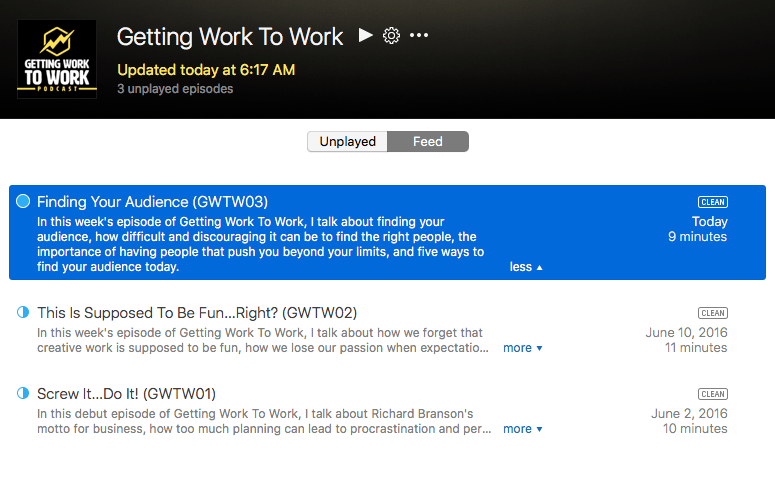
Finding Your Audience

In this week’s episode of Getting Work To Work, Chris Martin talks about finding your audience, how difficult and discouraging it can be to find the right people, the importance of having people that push you beyond your limits. and five ways to find your audience today.

Listen now >

Your Email Says Absolutely Nothing

Here’s the sound a blind person hears when their screen reader reads your email aloud that only contains a graphical image announcing an event:

“Image, Event announcement”

Pro Tip: Don’t send email messages that have all the content in your super cool Photoshop/MSPaint graphic.

The Creative World’s Bullshit Industrial Complex

They are what philosopher Harry Frankfurt would call “bullshitters.” Those that are giving advice for the sake of giving advice, without any regard as to how it is actually implemented, if it can even be implemented at all. “It’s not important to [the bullshitter] what the world really is like,” he says in a short video documentary about the phenomenon (below). “What is important is how he’d like to represent himself.”

This Bullshit Industrial Complex has always existed. But thanks to the precarious economics and job prospects of the creative person, it is often in a creative’s financial interest to climb the bullshit pyramid. In the short term, it’s creating a class of (often young) creatives deluded into thinking they are doing something meaningful by sharing “advice.” Long term, it’s robbing us of a creative talent.

Read the entire story on 99U >

Using IBM Watson Language Translation Services with Python

Here is a very simple example using Python of calling the IBM Watson Language Translation Service. Feel free to use and modify the code as needed. You will need an IBM Bluemix account in order to use the translation service.

# CTEC 121 Intro to Programming and Problem Solving
# Bruce Elgort / Clark College
# Using IBM Watson's Language Translator
# February 27, 2016
# Revised: May 24, 2016
# Version 1.1

import requests

def cls():
    print("\n" * 5)

def translate_text(text,source,target):
    username = 'your username'
    password = 'your password'
    watsonUrl = 'https://gateway.watsonplatform.net/language-translation/api/v2/translate?source=' + source + '&target=' + target + '&text=' + text
    try:
        r = requests.get(watsonUrl,auth=(username,password))
        #print(r)
        return r.text
    except:
        return False

def welcome():
    message = "Welcome to the IBM Watson Translator\n"
    print(message + "-" * len(message) + "\n")
    print("Have fun!\n")

def main():
    cls()
    welcome()

    data = input("Enter some text to be translated:\n")

    print()
    print("What language should I translate it to?")
    print("1) Spanish")
    print("2) Arabic")
    print("3) French")
    print("4) Portuguese")
    print()
    target = input("Select a language from the list above: ")

    if target == "1":
        target = 'es'
    elif target == "2":
        target = 'ar'
    elif target == "3":
        target = 'fr'
    elif target == "4":
        target = 'pt'

    results = translate_text(data,'en',target)
    print()
    print("Here is the text translated for you:")
    print(results)

main()


Using IBM Watson Tone Analyzer with Python

Here is a sample Python program that you can use to analyze the tone of text using IBM’s Watson Tone Analysis service on Bluemix. To get started with Bluemix you can sign up at http://bluemix.net. Feel free to use and modify the code as needed.

# CTEC 121 Intro to Programming and Problem Solving
# Bruce Elgort / Clark College
# Using IBM Watson's Tone Analyzer to detect and interpret emotional, social, and writing cues found in text.
# February 26, 2016
# Version 1.0

import requests
import json

def analyze_tone(text):
    username = 'your username'
    password = 'your password'
    watsonUrl = 'https://gateway.watsonplatform.net/tone-analyzer-beta/api/v3/tone?version=2016-05-18'
    headers = {"content-type": "text/plain"}
    data = text
    try:
        r = requests.post(watsonUrl, auth=(username,password),headers = headers,
         data=data)
        return r.text
    except:
        return False

def welcome():
    message = "Welcome to the IBM Watson Tone Analyzer\n"
    print(message + "-" * len(message) + "\n")
    message = "How it works"
    print(message)
    message = "Perhaps a bit too aggressive in your emails? Are your blog posts a little too friendly? Tone Analyzer might be able to help. The service uses linguistic analysis to detect and interpret emotional, social, and writing cues found in text."
    print(message)
    print()
    print("Have fun!\n")

def display_results(data):
    data = json.loads(str(data))
    print(data)
    for i in data['document_tone']['tone_categories']:
        print(i['category_name'])
        print("-" * len(i['category_name']))
        for j in i['tones']:
            print(j['tone_name'].ljust(20),(str(round(j['score'] * 100,1)) + "%").rjust(10))
        print()
    print()

def main():
    welcome()
    
    data = input("Enter some text to be analyzed for tone analysis by IBM Watson (Q to quit):\n")
    if len(data) >= 1:
        if data == 'q'.lower():
            exit
        results = analyze_tone(data)
        if results != False:
            display_results(results)
            exit
        else:
            print("Something went wrong")

main()

On Teaching

As a college instructor, there is one thing that I rarely have ever talked about and that is how I have improved my skills. Every day in class I am constantly being asked to help solve student programming problems and demonstrate and explain my solutions. There has rarely been a time when I couldn’t come up with a solution.

The other skill that I have developed is solving problems “over the air”. What this entails is being able to solve a student’s problems without even seeing their code. I ask a series of questions and by the time we get to the second or third question the student has resolved their own problem.

I highly recommend that you give teaching of any kind a try. It will not only help your students but yourself.