Soon Enough: the day you’re waiting for, up in your menu bar

A small Mac app for counting down to the good things. Free for a week, no account, no card.

I kept doing the same arithmetic in my head. How many weeks until the quarter ends? How many days until the trip? How long until the thing I had been looking forward to since March?
The calendar can tell you, but you have to go ask it, and by the time you find the date and count backward, you have lost the small pleasure of knowing. I wanted the number to just be there, the way the clock is there.

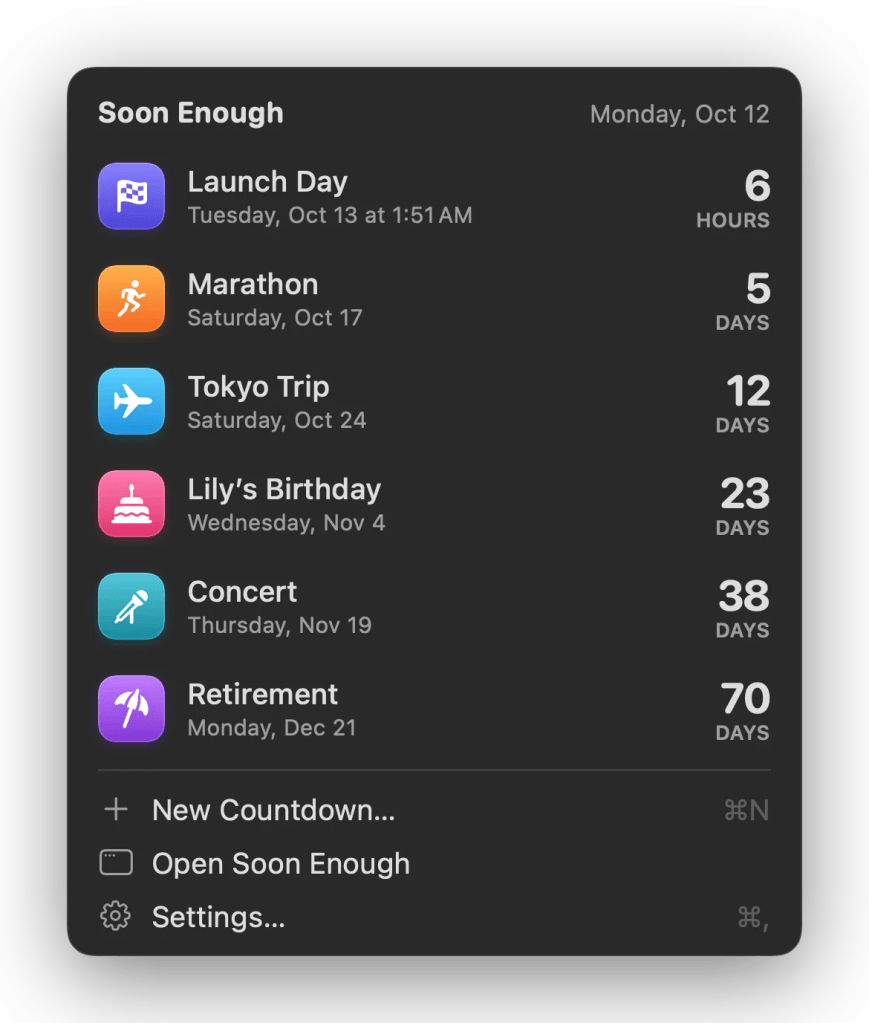
So I built Soon Enough. It puts the next big day in your menu bar, and the rest of them in widgets on your desktop.

The next one, always visible

Click the menu bar, and you get the list: what’s next, what’s after that, and how long each is. It counts in days until the last day, then hours, then minutes.

Nothing to open, nothing to search.

Widgets you’ll actually keep

This is the part people seem to like most. A countdown can be a plain number, a ring that empties as the day approaches, or a split-flap departure board that used to clatter in train stations.
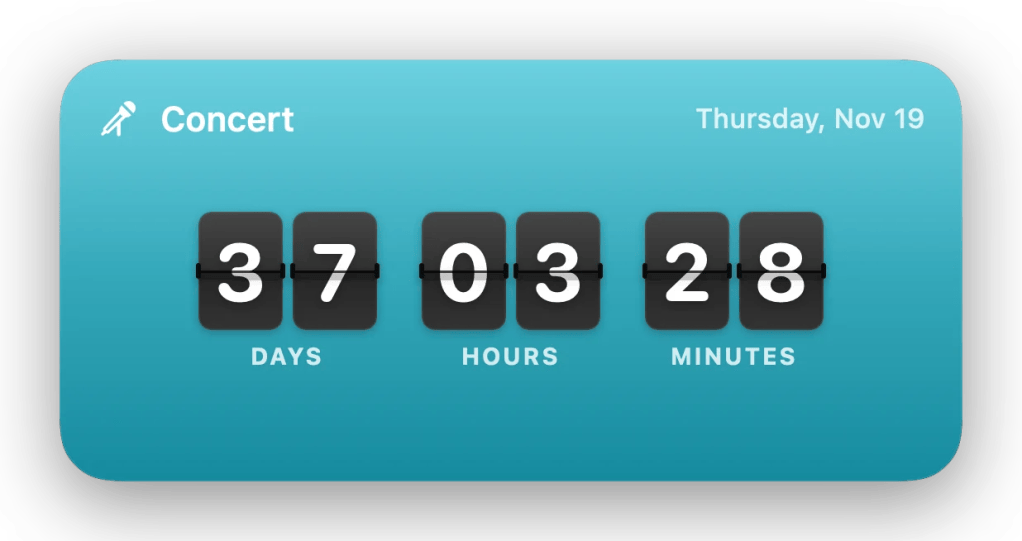
And you can put a photo behind it. The beach you’re going to, the person whose birthday it is, the mountain you’re flying out to ski. It turns a number into something you’re glad to glance at — which, for an app about things you’re looking forward to, is most of the point.

Fourteen colors, and about six and a half thousand symbols to pick from, so a countdown can look like the thing it’s counting to.

For students and teachers

If your school uses Canvas, paste your calendar feed link into Settings › Canvas and every due date starts counting down on its own, by course. No re-typing, no keeping two lists in step. Assignments appear as they’re posted and disappear as they pass.

I teach, I use this, and it is the feature I would not give up.

The small things

It talks to Siri and Shortcuts, shows up in Spotlight, and syncs through your own iCloud account if you want it on more than one Mac. It can remind you on the day. Every destructive thing can be undone. It works properly with VoiceOver.

It updates itself.

Your countdowns live on your Mac. No ads, no analytics, no tracking, and no account to make — I never see your data because it never comes to me.

What it won’t do

It is not a task manager, and I have deliberately kept it from becoming one.

No projects, no subtasks, no priorities, no completion percentages. A countdown is a date, a name, and how long is left. If you want to track work, you already have something better than this.

It needs macOS 15 Sequoia or later. That one stings a bit — it rules out some older Macs — but Sequoia is what makes the widgets behave the way I wanted.

It is Mac only. There’s no iPhone app (yet), and I’m not promising one.

Try it for a week

Soon Enough is free for seven days, with every feature unlocked. No account.

No credit card. Download it, and it just runs.

After the week, a license is $9.99, once — not a subscription — and it covers up to three of your Macs. And if you don’t buy one, the app doesn’t hold your countdowns hostage: the menu bar and your widgets keep working. You just need a license to add or change a countdown.

If it turns out it’s not for you, email me within 30 days, and I’ll refund it.

Download the free trial at soonenough.app

If you try it, I’d genuinely like to know what you’re counting down to.

Highly Recommended: Above Avalon Podcast

Neil Cybart publishes the Above Avalon podcast and website. I have been listening to his podcast now for a few weeks and really enjoy the conent.

Above Avalon takes a weekly look into Apple topics ranging from business strategy to product outlooks

Let me know what you think of his show. Highly recommended.


TUAW: This is the most important Mavericks keyboard shortcut you’ll discover all day

Mavericks’ new Control-Command-Space bar shortcut came up once again during conversation in the TUAW chat room this morning. Once again, I was surprised that this cool little trick isn’t universally known.

As a public service announcement, we’d like to continue to spread the word about this delightful shortcut. Get yourself over to any text entry field on your Mavericks Mac and give it a try by pressing Control and Command together and then tap the space bar. The resulting pop-up provides easy access to smilies and emoji that you can drag to your favorite app.

emojis

More >

EYE Chart Magazine – Putting Apple and Tech News in Focus

Ken Ray of the MacOSKen podcast has started a new Apple news magazine called EYE Chart available in the App Store:

This digital-only publication covers Apple news and technology news, since it’s nearly impossible to cover one without covering the other. Monday through Friday, readers will get financial news, hardware news, software news, retail news, consumer news and more. If it’s Apple or related to Apple, EYE Chart aims to cover it.

You can get the magazine as a single issue for $1.99 (non-subscription), 1-month subscription for $4.99, automatically renewed until canceled. Payment for all purchases will be charged to your iTunes account at the confirmation of your purchase.

Go download it now >

Mac-cessibility Network: All Things Accessibility for Apple Products

On the October 13, 2013 episode of the legendary MacCast, Adam Christianson interviews  Josh de Lioncourt, a blind Apple products user. Josh is part of the Maccessibility Network which focusses on accessibility of Apple products:

Maccessibility is devoted to connecting, compiling, and providing easy access to the best resources for blind, visually impaired, and other disability groups using Apple products. It is maintained by a dedicated group of visually impaired volunteers, who are Apple enthusiasts themselves.

Maccessibility began in 2007 as a project on Lioncourt.com to provide news and informational materials to low and no vision users of the Mac platform. Additionally, it served as a resource to dispel false information regarding the accessibility of Apple products.

As somebody who relies on accessibility on both OS X and iOS I am surprised I didn’t know about the Maccessibility site sooner. Many thanks to Adam for a great interview with Josh and for his awesome MacCast podcast.


Fill in the blank

The other day Voker Weber shared his thoughts about BlackBerry and he stated the following:

The sentiment. BlackBerry smells of old. People want new. iPhone. Maybe Android. Once people have made up their mind to divorce you, it’s a tough thing to turn around. It’s no longer good enough to be good enough. You have to be way better.

Now let me change the above to this:

The sentiment. ______________ smells of old. People want new. iPhone. Maybe Android. Once people have made up their mind to divorce you, it’s a tough thing to turn around. It’s no longer good enough to be good enough. You have to be way better.

Unfortunately, I can think of dozens of products and services that can be filled in the blank. The world has certainly changed over the last decade and sometimes no matter what a company and/or organization does, they can’t turn it around.

Shiny and new are the “new black”.