Damien Katz: What a difference a few months make

I miss Couchbase terribly, but I’m also glad to be done and start a new chapter in my career. The thing I miss most are the great people there, super bright hard working folks who amazed me on a daily basis. Which, ironically, was the thing that made it easy to leave. Seeing the different teams taking the ball and running with it without me leading the charge. Things at Couchbase grew and matured so fast I started to realize I couldn’t keep up without spending way more time working. I was no longer the catalyst that moved things forward, I was becoming the bottleneck preventing engineers from maturing and leaders from rising.

And now what’s next? Well, beginning in January 2014 I’ll be starting at salesforce.com and working closely with Pat Helland on a project that eventually will underpin huge amounts of their site infrastructure, improving performance, reliability and predictability, while reducing production costs dramatically.

Best of luck Damien. I remember sitting in Orlando talking with you and Julian Robichaux about CouchDb back in 2005/2006. You can do anything.

More >

Having Fun With Photobricks for iOS and OS X

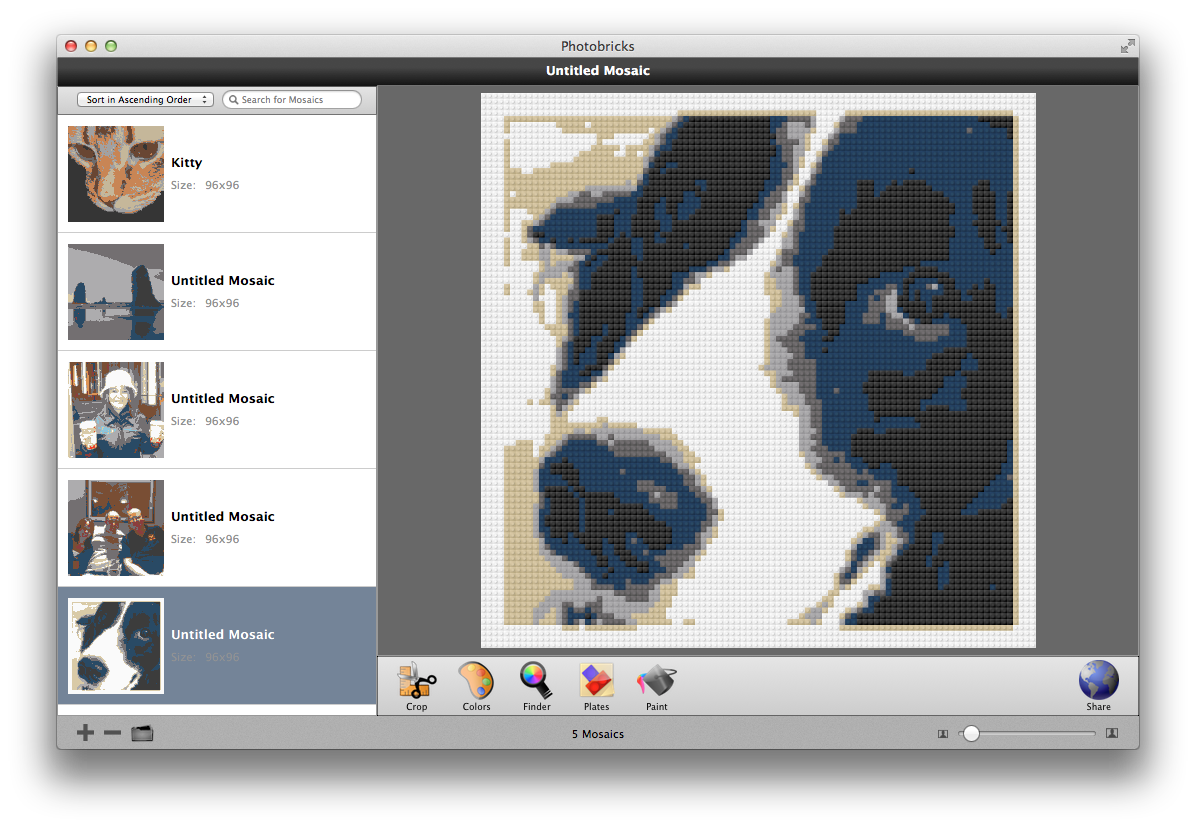
Just a few minutes ago I discovered the Photobricks app for OS X and iOS which creates LEGO™ mosaics from photographs.

Photobricks is a completely free, ridiculously easy-to-use mosaic creation software specialized to work with LEGO® bricks. With Photobricks, you can make beautiful mosaics from your favorite images with the push of a button. For those of us who like to have more control, you can further customize the mosaic by cropping and changing the colors of individual bricks. You can then view what types of bricks you’ll need to build your mosaic and, when you’re finished with your masterpiece, you can share it in a variety of ways with others thanks to the built-in publishing options. Excited? You can start using Photobricks right now by visiting the Download page. Not convinced yet? You can check out Photobricks for Mac or Photobricks for iPhone, iPod touch to learn more about Photobricks.

Here is a mosaic of the mighty Domino Designer which will be our next LEGO™ project:

Photobricks screenshot of DominoOnce your mosaic is complete you can generate a list of the plate bricks that you need to build it:

Plate list for Photobricks

What a great app! This puts a whole new spin on LEGO™ obsession.

Don’t Distract New Programmers with OOP

Thomas Gumz sent me a link to a blog entry entitled “Don’t Distract New Programmers with OOP“. Having just wrapped up one year of teaching “Intro to Programming and Problem Solving” to students at Clark College, I could not agree more. One of the core outcomes of my class is centered around functional decomposition – how to break down a problem into smaller, simpler parts.

When I get asked “What’s a good first programming language to teach my [son / daughter / other-person-with-no-programming-experience]?” my answer has been the same for the last 5+ years: Python.

I get this same question almost on a daily basis from so many people. Admittedly, before I started teaching the class I questioned the use of Python for new programmers. Well, guess what? It’s the perfect language and I have the results to prove it.

Did we cover object oriented programming in the class – yes, but not to the level that most would expect. We did just enough for students to wrap their heads around the concept. In fact, one student tried to use OOP for their final project and had a heck of a time. In fact this student was pushing for more OOP content and after the class concluded they admitted that OOP was much harder then they expected it to be.

The shift from procedural to OO brings with it a shift from thinking about problems and solutions to thinking about architecture. That’s easy to see just by comparing a procedural Python program with an object-oriented one. The latter is almost always longer, full of extra interface and indentation and annotations. The temptation is to start moving trivial bits of code into classes and adding all these little methods and anticipating methods that aren’t needed yet but might be someday.

Be sure and read the blog entry as I think that you will agree with avoiding OOP in an introductory programming class. If you are interested in learning more about pursuing a programming career drop me an email as I would love to help.

You can read what others are saying about this article on Yacker News.

More >

TUAW: This is the most important Mavericks keyboard shortcut you’ll discover all day

Mavericks’ new Control-Command-Space bar shortcut came up once again during conversation in the TUAW chat room this morning. Once again, I was surprised that this cool little trick isn’t universally known.

As a public service announcement, we’d like to continue to spread the word about this delightful shortcut. Get yourself over to any text entry field on your Mavericks Mac and give it a try by pressing Control and Command together and then tap the space bar. The resulting pop-up provides easy access to smilies and emoji that you can drag to your favorite app.

emojis

More >

Auto Scaling for Amazon EC2 in the AWS Management Console

Now this is exactly what I was wanting for my AWS EC2 based projects:

We are pleased to announce that it’s now even easier to use Auto Scaling to manage your Amazon EC2 capacity and maintain availability of your applications. Starting today, you can use the AWS Management Console to create and update Auto Scaling groups and launch configurations.

To get started, log in to the Amazon EC2 console and choose “Auto Scaling Groups” in the panel at the left, or click here.

In the console, you can create an Auto Scaling group based on a template that you define for your instances. You specify the number of instances you want to run and Auto Scaling will launch the instances for you, keeping them balanced across Availability Zones and replacing unhealthy ones.

You can also create scaling policies that adjust your group size dynamically in response to Amazon CloudWatch metrics, such as average CPU utilization. Even if your application only requires a single instance, using Auto Scaling can help you keep it available by replacing the instance if it fails status checks.

For more information, see Get Started with Auto Scaling Using the Console in the Auto Scaling Developer Guide.

awsautoscaling

Time to go and experiment.

Learning How to Code with Bruce: The Results

For the past year, I have been teaching a course at Clark College in Vancouver, Washington called “Intro to Programming and Problem Solving (CTEC 121)”. During this time 60 students have successfully completed the course. Here is the class description from the course catalog:

Fundamental concepts related to designing and writing computer programs and procedures. Topics covered include: problem-solving techniques, program design, coding, debugging, testing and documentation. The course stresses concepts common to all programming. Prerequisite: Eligibility for ENGL& 101 and a grade of “C” or better in MATH 095. CTEC 120 recommended.

Typically, 95% of the students who take this class have had no prior experience with programming. In fact, it may even be higher than this.

RECAP: Students in CTEC 121 have never ever written a single line of code.

One other important to thing to mention is that 80% of the students who enroll in this class are not enrolled in a development focussed degree program. Most are from networking, business and other disciplines. Fascinating eh? Read on…

For the Fall quarter I decided to not give a final exam but rather a final practical project. Students were required to build a full-fledged application using the Python programing language. The project requirements included:

  • Demonstrate use of all elements of the structure theorem (sequence, selection and repitition)
  • Use on or more Python libraries
  • Demonstrate the ability to read/write files
  • and many other requirements…

On Monday the class presented their projects to the class and frankly, the students and I were totally blown away by their projects. Remember, these students have only studied programming in the CTEC 121 class for 9 weeks prior to creating their final projects. I wish you all could have seen the students faces when they saw demonstrations presented by the others.

To give you an idea of the types of projects submitted here is a list of some of the apps students created:

  • An app that helps racing pit crews with calculating critical data needed for fueling, tire replacements and more
  • An app that uses the Wikipedia API to read and display random Wikipedia entries using JSON and REST services.
  • A math quiz app
  • A complete graphical version of the game Battleship
  • Several role playing games both text and based and graphics based
  • The game Othello done with the graphics.py Python library
  • A flash card creation and presentation app
  • Several awesome versions of Tic-Tac-Toe
  • An image processing app just like Instagram (complete with an MSI installer)
  • and many others

Congratulations to all of the CTEC 121 students on creating such awesome final projects. You made this instructor very proud.