Visual Studio Code – 10 Keyboard Shortcuts You Need to Know

Here are 10 of Visual Studio Code keyboard shortcuts that will help you out a lot. Give them a shot and let me know what you think.

Turn off word-wrap
Windows: Alt + z
Mac: ⌥ + z

Toggle the sidebar
Windows: Control + b
Mac: ⌘ + b

Toggle File explorer
Windows: Control + Shift + e
Mac: ⌘ + ⇧ + e

Quick Open a File
Windows: Control + p
Mac: ⌘ + p

Reopen a tab you just closed
Windows: Control + Shift + t
Mac: ⌘ + ⇧ + t

Close the Active Tab
Windows: Control + w
Mac: ⌘ + w

Go to a specific tab that is open
Windows: Alt + number
Mac: ⌃ + number

Add cursor to lines above/below
Windows: Control + Alt + up/down
Mac: ⌘ + ⌥ + up/down

Move a line of code up or down (or block of code)
Windows: Alt + up/down
Mac: ⌥ + up/down

Toggle the VS Code Terminal Window
Windows: Control + ~
Mac:  ⌘ + ~
 

Bruce Elgort believes…

  • We are our best selves when challenged.
  • Students gain far more from correcting their own answers than from being corrected by the instructor.
  • Learning to learn will help all students pass all their class, and develop their critical thinking skills.
  • All students should pass this class, and the next, and the next.
  • He is not an answer key.
  • If he were to answer “Is this correct?” questions from students, then students will quickly get the message that they cannot trust their own self-assessment skills. This is poor training for success on quizzes, exams, and especially the real world, where there are no answer keys.
  • Learning is slow, takes time and effort.
  • Asking questions is the best way to help yourself, and your group.
  • Knowing why your answer is right is just as important as the answer itself.
  • Answers are best said by students.
  • Instruction should be kept simple.
  • Reflection is the only way to see our larger truths.
  • Activities should be completed by the instructor multiple times.

Where to find Bruce at Clark College Winter 2019

Classes Bruce is teaching:

  • CTEC 121 – Intro to Programming and Problem Solving (Python) (M/W 10:30AM – 12:50 PM)
  • CTEC 122 (online) – HTML Fundamentals
  • CTEC 127 – PHP and SQL 1 (T/Th 10:30AM – 12:50 PM)
  • CTEC 293 – Web Skills Portfolio
  • CTEC 290 – WordPress Development

Mondays through Thursday

  • 2:00 – 3:15 PM Office Hours in SHL 127


Reflecting on my journey as a community college instructor

The one thing I absolutely love about my job as an instructor is the ability to share my experiences working in corporate America, starting an open source community for IBM, producing a podcast with 177 episodes, owning a successful software startup and being involved with social media since 2001. I have seen and experienced it all. The good, bad and ugly. Sharing these experiences resonates with students and colleagues.

Thank you to all of you who have been part of my journey.

Where to Find Bruce at Clark College – Fall 2018

Classes I am teaching:

  • CGT 205 – Web Design 1
  • CTEC 121 – Intro to Programming and Problem Solving (Python)
  • CTEC 122 (online) – HTML Fundamentals
  • CTEC 165 – Business Web Practices

Mondays and Wednesdays

  • 2:00 – 3:45 PM Office Hours in SHL 127
  • 4:00 – 5:50 PM CTEC 165 in SHL 125 (Monday) / FHL 126 (Wednesday)

Tuesdays and Thursdays

  • 1:00 – 3:50 PM CTEC 121 – Into to Programming and Problem-Solving in SHL 124
  • 4:30 – 5:30 PM Office Hours in SHL 127
  • 6:00 – 8:50 PM CGT 205 – Web Design 1 in AA4103

Clark College Course Schedule

Clark College Exceptional Faculty Award

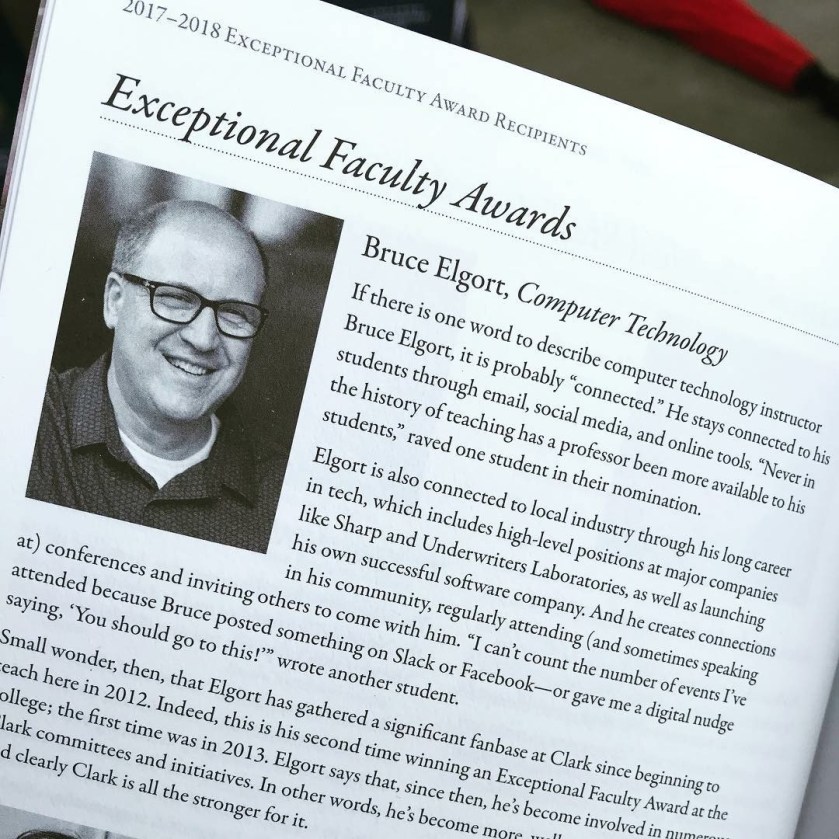
Last night at the Clark College Commencement ceremony I was recognized for receiving the “Exceptional Faculty Award”. There are 5 professors who received this award for the 2017/2018 academic year. There are over 600 faculty members at the college. I am very honored to have received this distinguished award. I want to thank my wife Gayle  Elgort for all her love and support. I’m also extremely grateful to the students who nominated me for this distinguished honor.

Bruce Elgort, Computer Technology

If there is one word to describe computer technology instructor Bruce Elgort, it is probably “connected.” He stays connected to his students through email, social media, and online tools. “Never in the history of teaching has a professor been more available to his students,” raved one student in their nomination.

Elgort is also connected to local industry through his long career in tech, which includes high-level positions at major companies like Sharp and Underwriters Laboratories, as well as launching his own successful software company. And he creates connections in his community, regularly attending (and sometimes speaking at) conferences and inviting others to come with him. “I can’t count the number of events I’ve attended because Bruce posted something on Slack or Facebook—or gave me a digital nudge saying, ‘You should go to this!’” wrote another student.

Small wonder, then, that Elgort has gathered a significant fanbase at Clark since beginning to teach here in 2012. Indeed, this is his second time winning an Exceptional Faculty Award at the college; the first time was in 2013. Elgort says that, since then, he’s become involved in numerous Clark committees and initiatives. In other words, he’s become more, well, connected to Clark—and clearly Clark is all the stronger for it.

I’m blown away…