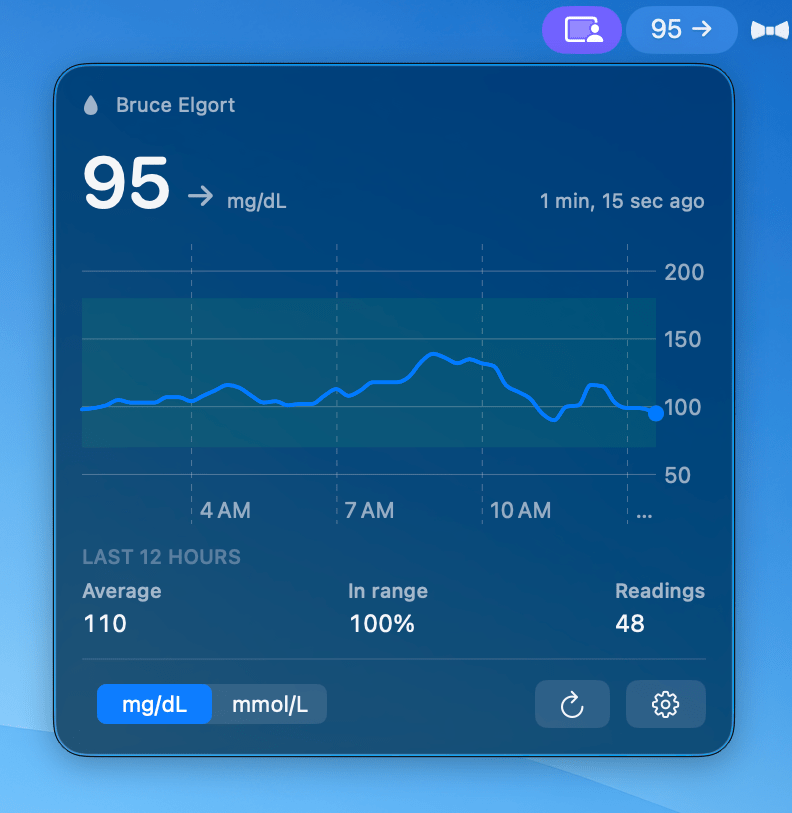
A few days ago, I wrote about LibreBar, the small macOS app I built to keep my current FreeStyle Libre glucose reading in the menu bar.
Today, I’m happy to share that LibreBar is now listed on MacMenuBar.com, a popular directory devoted entirely to Mac menu bar apps.
The listing describes LibreBar as a native macOS app that displays your latest glucose reading, trend arrows, and a 12-hour chart. It also highlights the desktop widgets, automatic updates, and support for both mg/dL and mmol/L. LibreBar appears in the site’s Health Apps collection alongside other menu bar tools designed to help people keep useful information close at hand.
There’s something satisfying about seeing LibreBar included on a site dedicated to exactly the kind of software I wanted to build: small, focused Mac apps that quietly make everyday life a little easier.
I built LibreBar because I wanted my glucose reading available without reaching for my phone or checking my watch. Knowing that more Mac users may now discover it through MacMenuBar.com makes me very happy.
LibreBar is free and requires macOS 14 or later, a FreeStyle Libre sensor, and a LibreLinkUp follower account.
You can find the new listing at MacMenuBar.com and download the app at librebar.app.
If you use LibreBar, I’d still love to hear what you think and what you’d like it to do next.

