College Student Worst Practices – The First Three

Worst Practice No. 1:

From an email sent to students: “If you have read this far and want 3 extra credit points, send a message to me by Tuesday at noon.” 5 days later and only 2 people replied.

If your teacher/instructor ever offers you extra credit points for reading a weekly announcement email, respond to them as soon as you read the words “extra credit”.

Worst Practice No. 2:

Don’t wait until the assignment or exam due date to ask for an extension. It’s ok to ask for an extension (in my classes). Communicate early and often. It’s ok. I’m human and sometimes life happens and I get that.

Worst Practice No. 3:

If you are the smartest person in the classroom, and you know more than most people, don’t use that as the platform to challenge or prove that the instructor is dumber than you or that you are smarter than everyone else, use it as an opportunity to help others in the class that may be struggling.

Canvas LMS: How to Validate Links in a Course

I’m not sure if this feature is new or not, but it certainly makes validating all of the links in a Canvas course easy to check.

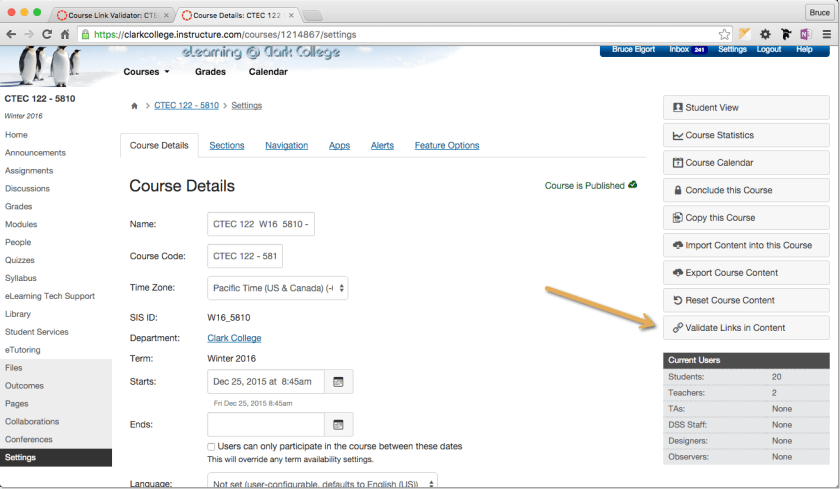
Start by logging into Canvas and going into the course you want to validate. In the left navigator, click on the “Settings” link:

2015-12-25_09-07-13.png

On the Settings page, look in the right navigator for the “Validate Links in Content” link and click on it.

2015-12-25_09-05-30.png

From the Course Link Validator page you can click on the button to start validating all of the links in all of your content in your course. It may take a few minutes for it to complete, so be patient.

2015-12-25_09-15-14.png

Once completed, you will see a list of all of the content with the associated links that are broken. You can then restart the link validation after you fix and links that the validator finds are broken.

I hope this helps you in developing quality Canvas course shells.