For those of you taking the edX CS50P – Introduction to Programming with Python course, I found this video helpful if you are new to unit testing.
Category: Development
Auto-Grading Assignments with GitHub Classroom
In this video, I demonstrate how you can use Python unit tests to auto-grade students’ assignments through GitHub Classroom.
Clark College Web Developer Extension for Firefox
There is now a browser extension for students enrolled in the Clark College Web Development program. The extension provides useful links and resources.
Install the extension from the Firefox Addons site.
Here’s the GitHub repo for those who want to see how it was built.
Not using Firefox? Well, there’s also a version of the extension for Chrome-based browsers such as Google Chrome, Brave, and Microsoft Edge.

How to share code snippets graphically like a pro
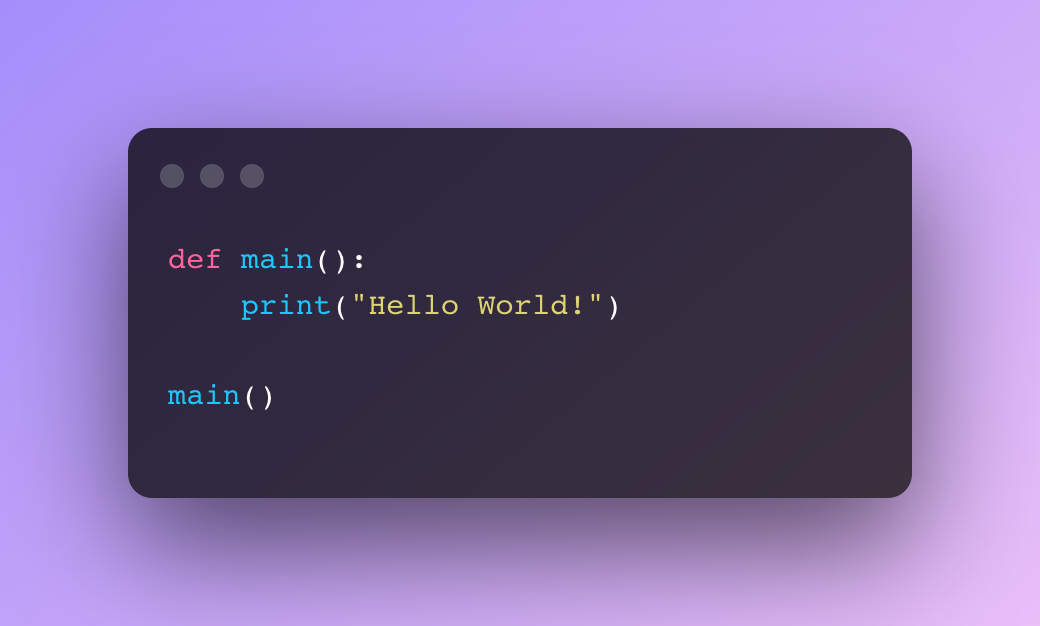
Output from the ray.so site
Have you ever wanted to share code snippets like the one above? Well, here are some tools that will help you create them:
- ray.so
- Carbon
- Visual Studio Code Extension Polacode 2020
Clark College Web Development Program Chrome Extension
There is now a browser extension for students enrolled in the Clark College Web Development program. The extension provides useful links and resources.
Install the extension from the Chrome Web Store. The extension also works in Microsoft Edge and Brave browsers.
Here’s the GitHub repo for those who want to see how it was built.
“Electric Lights” Game for Microsoft Windows
Here’s a short video demonstration of a program called “Electric Lights” that I wrote back in 1992 with a friend of mine. It’s based on the children’s toy “Lite-Brite.” The game was written in Microsoft C using the Microsoft Windows SDK.
Announcing Two New Non-Credit Classes at Clark College
I’m happy to announce two new exciting “non-credit” courses that are being offered this Fall through Clark College that I wanted you to know about!
- Develop Web Pages Using HTML & CSS Level 1 – The first section of this course starts on October 12, 2020, and runs for 3 weeks. Classes are on Zoom on Mondays and Wednesdays from 6:00 – 9:00 PM. The courses are being taught by Regina Pilipchuk and Kyle McDonald. To learn more about these courses visit https://www.campusce.net/clark/course/course.aspx?C=5291&pc=167&mc=170&sc=0
- Program Using Python – The first section of this course starts on October 13, 2020, and runs for 3 weeks. Classes are Zoom on Tuesdays and Thursdays from 6:00 – 9:00 PM. These courses are being taught by me, Bruce Elgort. To learn more about these courses visit https://www.campusce.net/clark/course/course.aspx?C=5292&pc=167&mc=170&sc=0
If you have any questions whatsoever, please get in touch with me.
My Favorite Deno Resources
Deno is a secure runtime for JavaScript and TypeScript.
The Deno runtime is implemented in Rust and TypeScript.
Learn about Deno at Deno Home page.
Videos on Deno
- Ryan Dahl — Deno, a new way to JavaScript
- Traversy Media – Deno Crash Course
- Web Dev Simplified – Deno Crash Course
- Fireship – Deno in 100 Seconds
- codeSTACKr – Deno 1.0 Released! (Easy) REST API Tutorial Using Oak
Books and other Resources
Visual Studio Code – 10 Keyboard Shortcuts You Need to Know
Here are 10 of Visual Studio Code keyboard shortcuts that will help you out a lot. Give them a shot and let me know what you think.
Turn off word-wrap
Windows: Alt + z
Mac: ⌥ + z
Toggle the sidebar
Windows: Control + b
Mac: ⌘ + b
Toggle File explorer
Windows: Control + Shift + e
Mac: ⌘ + ⇧ + e
Quick Open a File
Windows: Control + p
Mac: ⌘ + p
Reopen a tab you just closed
Windows: Control + Shift + t
Mac: ⌘ + ⇧ + t
Close the Active Tab
Windows: Control + w
Mac: ⌘ + w
Go to a specific tab that is open
Windows: Alt + number
Mac: ⌃ + number
Add cursor to lines above/below
Windows: Control + Alt + up/down
Mac: ⌘ + ⌥ + up/down
Move a line of code up or down (or block of code)
Windows: Alt + up/down
Mac: ⌥ + up/down
Toggle the VS Code Terminal Window
Windows: Control + ~
Mac: ⌘ + ~
Free “Learn CSS Grid” Video Series
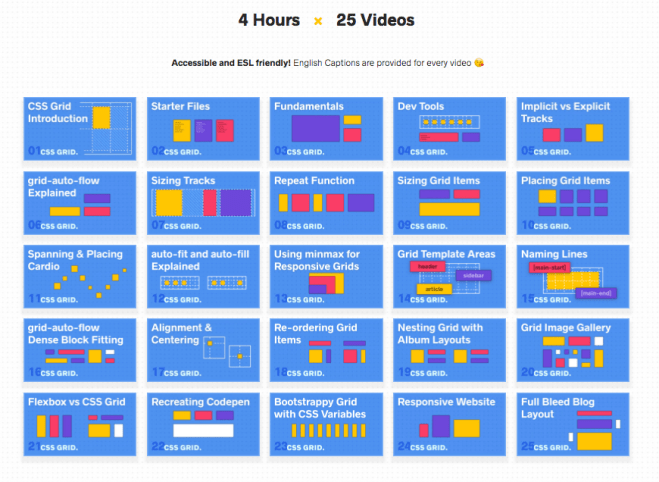 Point your browser here to get started with this free video series covering all things CSS Grid.
 Bruce Elgort